Every job’s photos, emails and invoices — filed automatically.
One folder per job that files itself. Forward a supplier email or text a site photo — it lands in the right job. That’s the one thing a shared Drive folder can’t do.
- EMAILRe: Shingle order — ABC Supplyauto-filed · 2m ago
- PHOTOIMG_4471.jpg — ridge captexted from site · 11m ago
- PDFInvoice_204_deposit.pdfauto-filed · 1h ago
On site, in your pocket
Your whole job — board and folder — in your pocket on site.
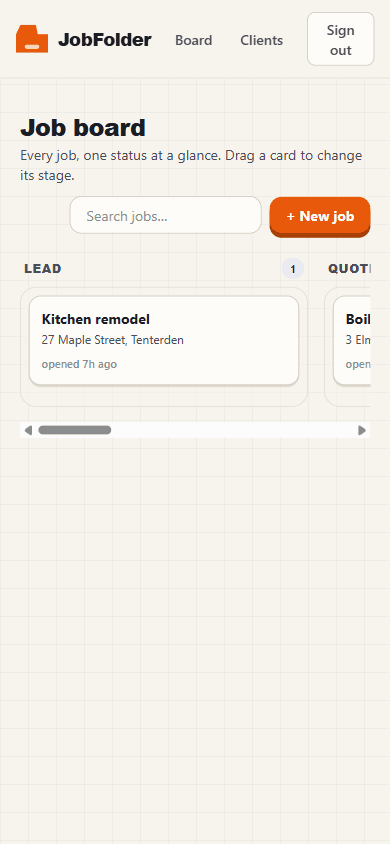
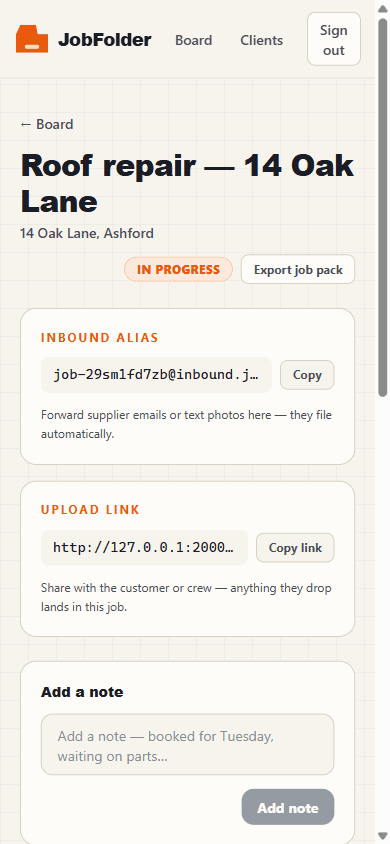
The status board across every job, and each job’s auto-filing folder with its own inbox address and upload link. Add JobFolder to your home screen and it opens like an app — no store, no install.
- Drag jobs along the board from the truck
- Forward an email — it files into the right job
- Copy the upload link and text it to the crew
How it works
Filing happens without you.
Email & photo auto-filing
Every job gets its own inbox address. Forward a supplier email or have the crew text a photo — JobFolder reads it and drops it in the right job.
Client & vendor upload links
Send a one-tap link. Homeowners and suppliers upload permits, receipts and photos straight into the job — no accounts, no chasing.
Status board across jobs
See every job on one board and drag it along: Lead → Quoted → In progress → Awaiting payment → Done. Nothing slips.
The kill question
“Why not just a shared Drive folder?”
Because a Drive folder just holds files. It can’t read a forwarded supplier email or a texted site photo and put it in the right job. You still sort everything by hand. JobFolder does the sorting.
Pricing
Simple flat pricing — never per-seat.
Free
Kick the tyres on a couple of live jobs.
- 3–5 active jobs
- Email & photo auto-filing
- 1 upload link
- Status board
Solo
For the one-person crew running every job.
- Unlimited jobs
- Full email & photo auto-filing
- Unlimited client & vendor upload links
- Status board across jobs
Team
Share job folders across the whole crew.
- Everything in Solo
- Up to ~5 users
- Shared job folders
- One flat price — never per-seat
Free resources
Get organized before you even sign up.
Field-tested guides and articles on keeping every photo, email and invoice tied to the right job — free to read, nothing gated.
A simple job status board workflow for small trades businesses (Lead → Paid)
A single board that shows every job and its stage — Lead, Quoted, In progress, Awaiting payment, Done — is the fastest way for a small crew to stop jobs slipping. Here's the workflow.
Read →WorkflowHow to send clients a file-upload link that files itself into the right job
Chasing homeowners and suppliers for permits, receipts and photos is a time sink. A self-filing upload link lets them send files that route straight into the correct job — no account, no chasing.
Read →Tools & comparisonJob folders vs a shared Google Drive: why Drive folders fail trades
A shared Google Drive can hold your job files, but it can't file them. Here's the honest comparison for trades — where Drive works, where it quietly fails, and what to use instead.
Read →FAQ
Straight answers.
Why not just use a shared Google Drive folder?
A shared Drive holds files but can't file them. It can't read a forwarded supplier email or a texted site photo and drop it into the right job, and it has no status across jobs — you do all the sorting by hand. JobFolder does the sorting for you.
How does the auto-filing actually work?
Every job gets its own inbox address and upload link. Forward a supplier email to that address or have the crew text a photo, and JobFolder reads it and files it into the correct job automatically — no manual uploading or sorting.
Do my clients or suppliers need an account?
No. You send a one-tap upload link tied to the job. Homeowners and suppliers upload permits, receipts and photos straight into the right job with no login and no app to install.
What does JobFolder cost?
There's a free plan for 3–5 active jobs, forever. Solo is a flat $15/month for unlimited jobs, and Team is a flat $39/month with shared job folders for up to about five users — one flat price, never per-seat.
Is my data secure?
Your files are stored in cloud object storage and encrypted at rest by our storage provider, associated only with the specific job you filed them under. We use privacy-friendly, cookieless analytics and never sell your data. You can export or delete any job and its contents at any time.
Which trades is JobFolder built for?
Trades and contractors who run multiple jobs at once — roofing, HVAC, remodelling, handyman and similar crews — where photos, emails and invoices arrive faster than you can sort them.
Stay in the loop
Get the free guides by email.
Want the PDF and future guides?
Drop your email and we’ll send this guide plus occasional trades tips.
We’ll email you the guide + occasional trades tips. No spam, unsubscribe anytime. We never sell your data. See our privacy policy.
Stop filing. Start finishing jobs.
Set up your first job folder in under two minutes. Forward one email and watch it file itself.
Start free